
Paid partnership & affiliate disclosure This article was created for a Bluehost promotional content campaign. We may receive compensation if the content is approved and published. We may also earn a commission when readers sign up or make a qualifying purchase through our affiliate links, at no additional cost to them. The website-building experience, observations, and screenshots described here come from our own hands-on demo project.
One prompt. A real demo website. My honest test.
I built, edited, and published BrightLeaf Digital Studio using Bluehost AI Builder. Here is what worked, what needed attention, and what the screenshots actually prove.
$0 to start, no credit card · Affiliate link · Verify current terms
Promising for a first draft. Human review still matters.
Bluehost AI Builder made it possible to turn a written brief into a multi-page demo website, refine its content through an AI chat, inspect an admin dashboard, and publish a version on a Bluehost subdomain. In my test, the biggest advantage was how much of the initial structure appeared without manually coding pages. The biggest caution is that generated content and functionality still need human review—especially contact forms, sample data, and anything that might look like a genuine business claim.
If you are searching for a practical Bluehost AI Builder review, the question is not simply whether AI can produce an attractive homepage. It is whether you can start with a business idea, make useful changes, understand what the generated website actually does, and get a result online. To explore that process, I created a fictional digital marketing agency called BrightLeaf Digital Studio. I used Bluehost AI Builder to generate the site, examined the preview and dashboard, requested changes in the chat, and opened the published website.
This is a review of that specific hands-on experience, not a promise that every website or app will behave identically. I did not run a long-term uptime test, measure conversion rates, purchase a paid plan, or connect a custom domain. Those limits matter when deciding whether the builder is right for a real business.
What Is Bluehost AI Builder?
Bluehost AI Builder is an AI-assisted website and app creation experience. Instead of starting with a blank design canvas, you describe what you want in ordinary language. The builder then works on an initial version, presents a preview, and lets you request revisions conversationally. Its interface also provides publishing controls and, for the type of project I created, an administrative area for managing structured content.
That combination is important. A typical small-business site may need more than a hero image and a few paragraphs. It may also need service descriptions, a project portfolio, a contact page, and a place for an owner to review or update information. Bluehost AI Builder attempted to bring those pieces together for my sample agency.
The product is $0 to start, no credit card. The free-start experience is particularly useful for evaluating the workflow before committing to a paid subscription. Paid features, billing terms, and custom-domain options should be checked against Bluehost’s current pricing page before making a purchase.
For a closer look at the alternatives, read our Bluehost AI Builder vs WordPress AI Builder comparison.
My Test Project: BrightLeaf Digital Studio
For this review, I did not use a real client’s brand or pretend to operate an established agency. I created a clearly fictional business, BrightLeaf Digital Studio, so I could test the builder without inventing real customer testimonials or business contact information.
The goal was a polished, mobile-conscious digital marketing website with an understandable navigation structure. The brief asked for a strong homepage, services covering website design, SEO, and digital marketing, an About section, a portfolio of clearly labeled sample projects, and a contact experience. I also wanted a blue-and-green visual direction and clear calls to action.
Using a fictional business was more than a convenience. AI-generated websites can look convincing even when their supporting information is made up. By explicitly asking for sample labels, I could inspect the design and editing workflow without presenting fictional customers, addresses, or messages as genuine.
My project ultimately showed a five-page structure, a service catalog, a portfolio area, a contact page, and an admin dashboard. The dashboard displayed three active services, six active projects, and four sample messages. These were demonstration records, not actual enquiries or customer leads.
Step 1: Starting With a Plain-English Prompt
The process began with a written instruction rather than a design template or code editor. The opening of my prompt read:
Create a modern, professional, mobile-responsive website for a digital marketing agency called BrightLeaf Digital Studio.
I then specified the major sections, the service categories, the desired visual style, and the need to keep fictional business details clearly marked. That level of detail helped define what a useful result would look like. A prompt that only says “make a business website” leaves much more room for assumptions.
After I submitted the brief, the Bluehost interface showed a build-in-progress state, including the message “Understanding your business…”. The prompt remained visible in the conversation panel while the preview area indicated that the initial build was underway. This made the process easy to follow: I could see what I had asked for and watch the builder move toward a site preview.
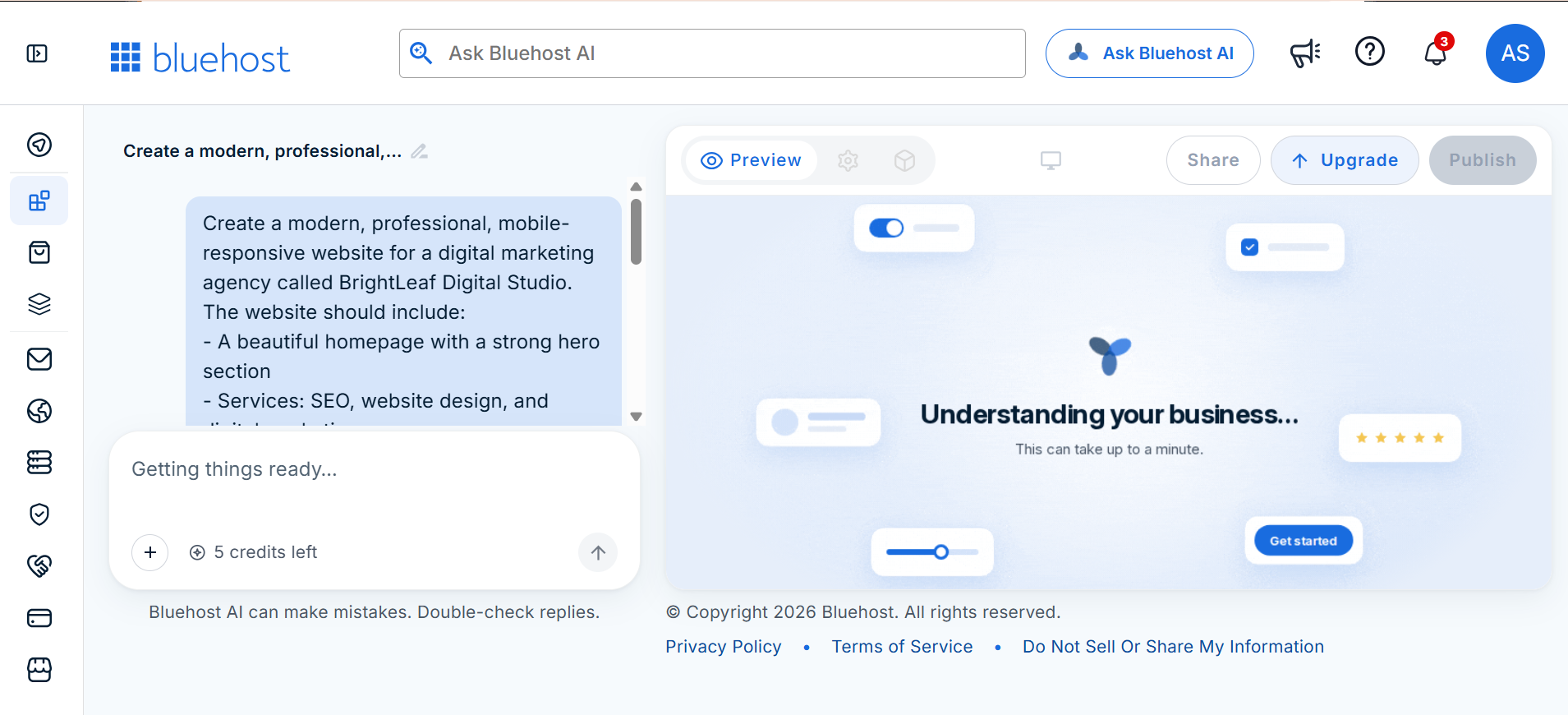
Suggested alt text: “Bluehost AI Builder processing a written prompt for the BrightLeaf Digital Studio demo website.”
What I learned from the first prompt
A specific prompt gave the project a clear starting point. Naming the pages, services, visual direction, and sample-content rules was more useful than relying on the AI to infer everything. It also made later review easier: I could compare the output with the original requirements rather than judge the result on appearance alone.
The initial generation did not eliminate the need to check the work. It simply moved the first round of layout and content creation into a conversational workflow.
Step 2: Reviewing the Generated Website
The website preview showed a recognizable small-agency layout with a prominent headline, supporting copy, a large image, navigation links, and clear action buttons. During the test, the homepage messaging changed as the project evolved. One version used “Grow your small business online”; a later published view displayed “Beautiful Websites. Smarter SEO. Better Business Growth.”
The design used a light background, dark navy typography, blue buttons, and green accents. That matched the broad visual direction of the brief. The navigation exposed Services, Portfolio, and About, with a prominent link to the contact demonstration. The site also displayed a notice that the business information was sample content.
I liked that the output was not just a single generic landing-page screenshot. The project included separate content areas and an administrative interface. For a small-business owner trying to visualize an idea quickly, that can make the first draft feel much more concrete.
However, a polished preview is not proof of a finished production website. Attractive images do not establish licensing suitability, and marketing copy does not demonstrate search rankings. Each page, link, image, claim, and interactive element still deserves inspection before a business starts sending customers to it.
Step 3: Editing the Site by Chatting With AI
One of the most useful parts of my test was seeing how a requested change affected the website. I focused on the contact form because it is easy for a demo to create the wrong impression. A visitor might assume that a professional-looking form sends messages to a real agency, even though BrightLeaf Digital Studio was only a fictional project.
I used the AI editing workflow to make the contact area demonstration-only. The builder’s response described keeping the existing layout while switching off submissions. In the resulting preview, the contact page explained that the form was for demonstration purposes and that nothing could be sent. The fields appeared greyed out, and the button read “Demo only — submissions disabled.”
That was a meaningful change: the page still demonstrated how a contact section could look, but it no longer invited visitors to send personal information to a fictional business. The AI response also indicated that existing sample messages in the dashboard would remain untouched.
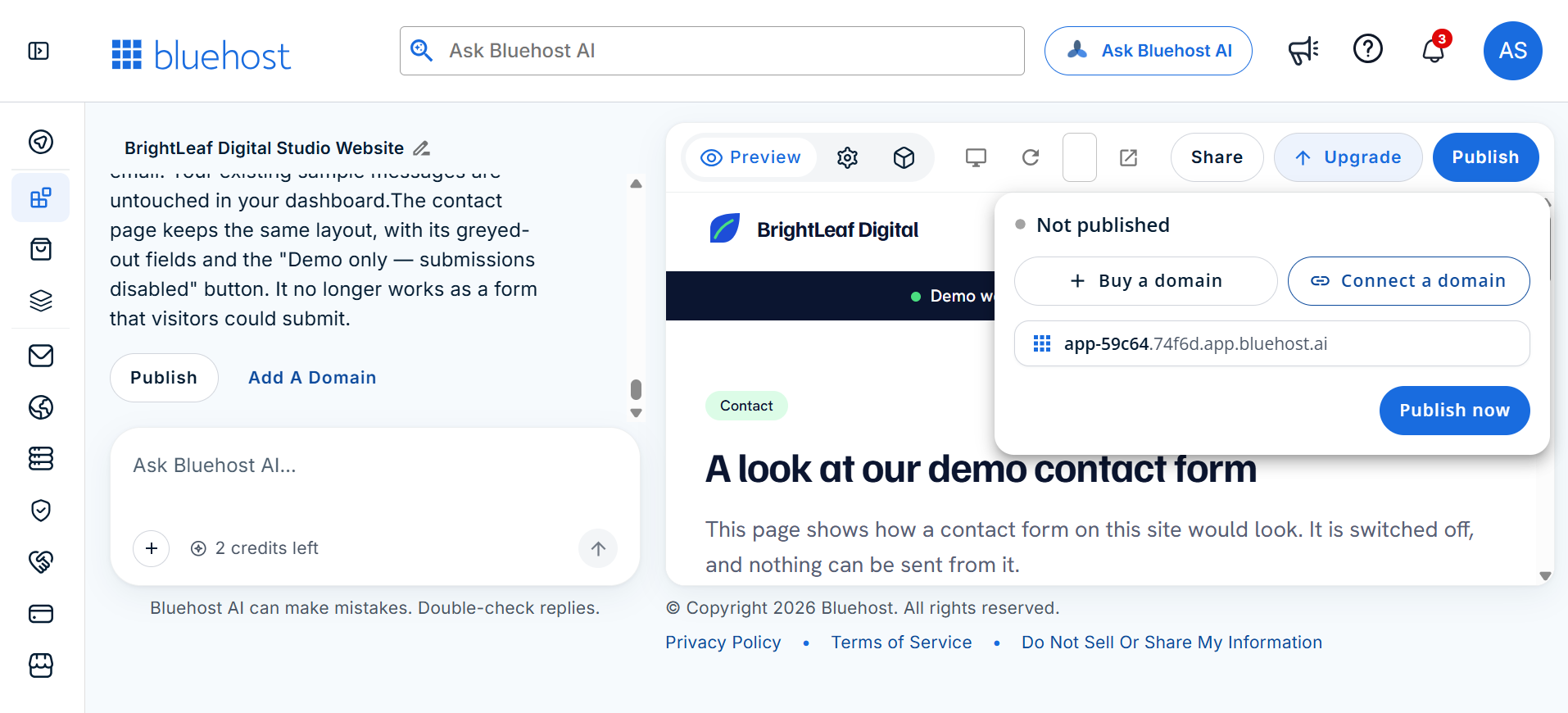
Suggested alt text: “Bluehost AI Builder chat explaining a demo-only contact form edit beside the website preview.”
Why this edit matters
The ability to describe a change conversationally is appealing if you are not comfortable editing code. Instead of locating form components or modifying event handlers, I could communicate the intended behavior in plain English and review the visible result.
There is an important distinction, though: the screenshot and preview support what the interface displayed; they are not a security audit of the underlying application. For a real business form, I would still test submissions, notifications, spam handling, privacy disclosures, and data storage before launch. In this demo, deliberately disabling the form was the appropriate outcome.
I also noticed a visible credit counter in the builder. It showed different remaining balances during the session, so it is worth checking how your own plan allocates AI changes. I would not assume every edit is unlimited or that every request consumes the same number of credits.
Step 4: Exploring the Admin Dashboard
The BrightLeaf Digital project included an admin area, which I accessed during testing. Its navigation showed sections for Dashboard, Users, Services, Projects, Messages, and Business details. That is a different experience from merely editing a static homepage: it suggests a structured way to view and manage the site’s information.
The dashboard summary displayed three active services, six active projects, and four sample messages, with two messages marked as new. A recent-messages table and quick links to add a project or edit services and business details were also visible. I could inspect a Users screen containing the admin account and a Messages screen listing the sample enquiries.
Those records should not be mistaken for real customers. The messages were sample data generated for a fictional demonstration. They are useful for understanding how a management interface looks, but they do not prove that a live lead-generation system has been tested end to end.
The admin area is one of the more interesting elements of this particular build. A service business may eventually need to change offerings, update portfolio items, or review enquiries. Having a management interface alongside the public site could reduce the gap between a visual prototype and a more useful business application. Whether that fits your real workflow depends on permissions, data handling, integrations, and testing that go beyond this review.
Step 5: Previewing and Publishing the Demo
The builder offered a preview area with controls for inspecting the website and a Publish action. I also viewed a narrower preview that displayed a compact navigation menu. That gave me a basic look at how the layout adapts to a smaller screen, although it was not a substitute for testing on multiple physical phones and browsers.
When I opened the publishing panel, the interface showed options to buy or connect a domain and a Bluehost-provided address. I used the provided subdomain for this demo rather than purchasing or connecting a custom domain. The builder displayed a published state during the session, and I opened the public-facing BrightLeaf Digital homepage in the browser.
The published page displayed the final agency-style hero, navigation, prominent blue call to action, and the “Demo website — sample business information” notice. The screenshot below is from the actual published demo, not a mockup created separately for this article.
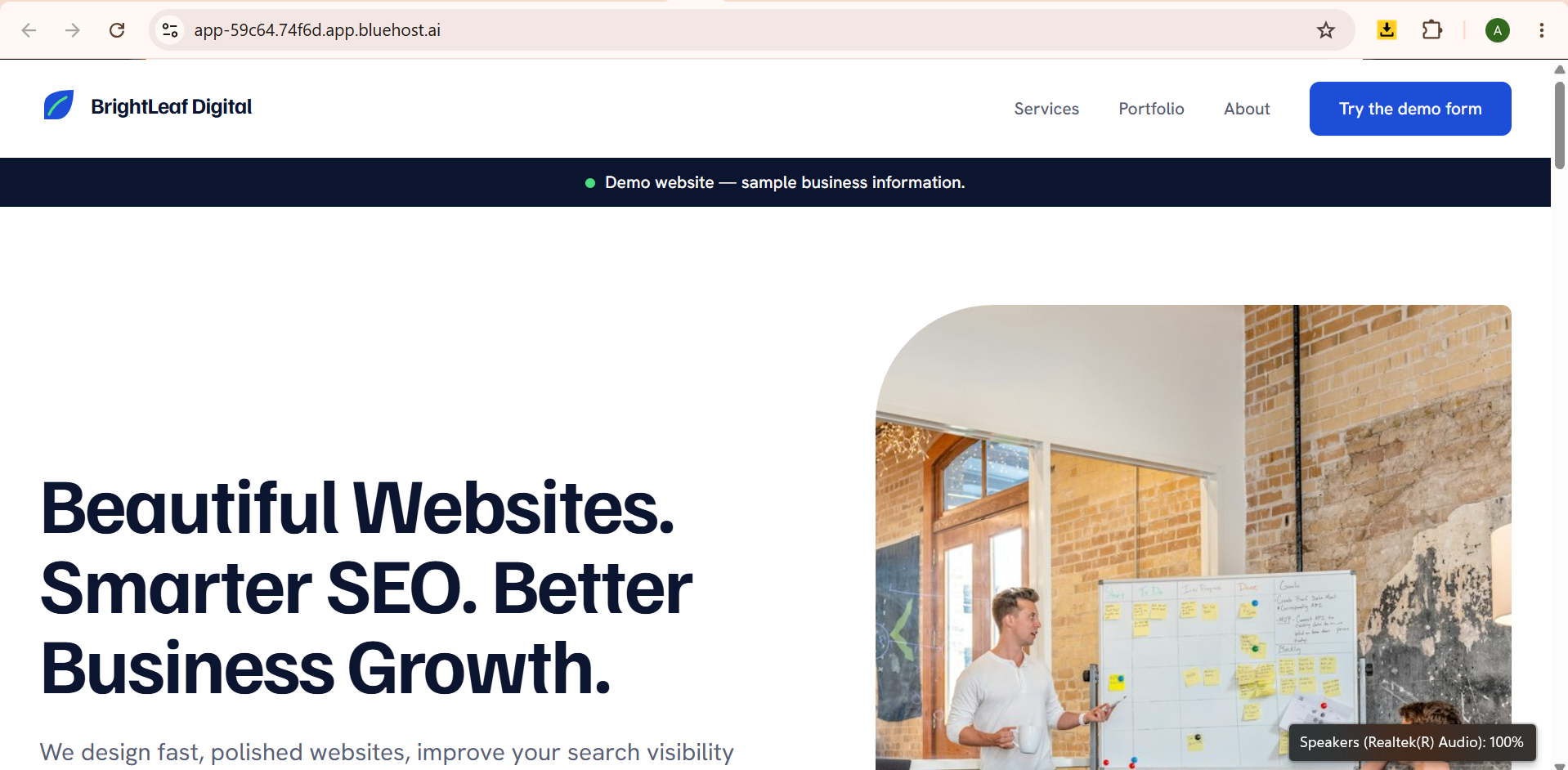
Suggested alt text: “Published BrightLeaf Digital demo homepage created using Bluehost AI Builder.”
The demo address shown during my test was https://app-59c64.74f6d.app.bluehost.ai/. Its availability may change after the test, so the original screenshots are the permanent record of the build for this review.
Publishing to a provider subdomain was a useful way to inspect the output without buying a domain. For a real company, I would also want to check the final domain setup, HTTPS behavior, page metadata, mobile usability, accessibility, and the complete contact workflow before announcing a launch.
Bluehost AI Builder Pricing: Can You Start for Free?
Free publishing on a Bluehost subdomain. Five AI credits per day, up to 30 per month.
Paid plans from $20/mo. Hosting included; connect your own domain.
The entry point advertised $0 to start, no credit card. That matched the way I approached this project: I could explore the builder and create a demonstration without beginning with a paid domain purchase. The builder also displayed an Upgrade option and a remaining-credits indicator.
Free access does not mean unlimited AI edits, and publishing to a Bluehost subdomain is different from connecting your own branded domain. Here is how the plans compare.
Bluehost’s November 2026 Partner Brief lists four monthly plans: $0 to start, no credit card, with paid plans from $20/mo. Hosting is included on every plan. The following figures are published plan details, not paid-plan features I personally tested.
| Plan | Monthly price (USD) | AI credits | Publishing / features |
|---|---|---|---|
| AI Builder Free | $0 | 5/day; up to 30/month | Bluehost subdomain |
| AI Builder Lite | $20 | 100/month | Connect your own domain |
| AI Builder Standard | $40 | 200/month | Lite features; more credits |
| AI Builder Pro | $80 | 400/month | Lite features; highest included credits |
Paid plans are billed monthly in USD and can be added from inside AI Builder. Lite, Standard and Pro allow a custom domain; registering or renewing a domain is a separate matter. All plans include access to 24/7 human support, according to Bluehost. I did not independently test that support service.
How AI credits work (and what happens at zero)
According to the Partner Brief, each message you send to the builder uses one credit, while clarifying questions from the AI are free. Free users receive five credits per day, capped at 30 per month. Monthly plan credits and purchased top-ups expire after 30 days. Top-ups are available in bundles of 50, 100 or 200 credits, starting at $15.
Running out of credits pauses new AI changes until your allowance refreshes or you buy more; it does not take the published site offline. Hosting does not consume credits. In my test, the visible credit counter made it clear that I needed to prioritize meaningful edits rather than repeatedly ask for small cosmetic changes.
For a small project, group related changes into a clear instruction and review the result before sending another message. A paid plan may make sense if you expect frequent revisions or need your own domain. I did not test credit purchases or renewal behavior firsthand.
I did not purchase a subscription or test paid-plan features, so I cannot give a firsthand assessment of billing, refunds, higher credit limits, or premium support. Pricing and promotional terms can change. Review the current terms inside Bluehost before upgrading, especially if a custom domain or a larger number of revisions is essential to your project.
What I Liked About Bluehost AI Builder
1. A concrete first draft from a detailed brief
The biggest advantage was getting beyond the blank page. My prompt described a fictional agency and its required sections; the builder responded with a recognizable website structure rather than requiring me to manually assemble each section from scratch.
2. Conversational editing
The contact-form change illustrated why chat-based editing is useful. I could describe the intended outcome and inspect the preview. That is approachable for users who think in terms of business requirements rather than CSS, components, or code.
3. Website and admin views in one project
The project included public-facing pages and an admin dashboard with services, projects, and sample messages. I did not fully test the underlying data operations, but the visible structure was more substantial than a static homepage mockup.
4. A way to inspect the published result
Publishing to a Bluehost subdomain let me view the output in a normal browser. Seeing the published site was more informative than relying only on the builder’s internal preview.
5. A free-start path for experimentation
For someone evaluating an idea, the ability to begin without a credit card lowers the commitment needed to test the workflow. It is still important to understand plan limits before depending on the tool for ongoing business changes.
Where Bluehost AI Builder Still Needs Human Attention
1. Generated content must be fact-checked
A credible-looking business website can accidentally imply real customers, reviews, addresses, or results. I avoided that problem by labeling BrightLeaf Digital as a demo and keeping its portfolio and messages explicitly fictional. A real business should replace all sample content with verified information.
2. Forms require functional and privacy testing
The original contact experience looked like a normal form. I deliberately changed it to a non-submitting demonstration. If you want to accept enquiries, verify delivery, storage, consent, spam protection, and the user experience after submission. A visible form alone is not proof that those systems work correctly.
3. SEO needs work beyond an AI-generated layout
The demo included SEO-related marketing copy, but that is not evidence of search optimization or rankings. I did not conduct a crawl, test structured data, verify canonical tags, connect search analytics, or measure organic traffic. For a production site, I would review titles, descriptions, heading hierarchy, image alt text, internal links, indexing controls, performance, and mobile accessibility.
Bluehost’s Partner Brief says the builder automatically generates page titles, descriptions, headings and image alt text and provides mobile-responsive layouts. Those are useful starting features, not proof of indexing or ranking. Before launch, inspect the actual generated metadata and mobile pages; after launch, check indexability and submit an appropriate sitemap to Bing Webmaster Tools and Google Search Console if available.
4. Credits and paid features need planning
The interface showed a remaining-credits counter and an upgrade option. If you expect frequent redesigns or many AI-driven changes, investigate the current plan allowance and renewal terms before choosing a subscription.
5. A preview is not a complete quality-assurance process
I saw the homepage, the contact demonstration, a narrower layout, and the admin interface. I did not exhaustively test every browser, every navigation path, all user roles, or long-term reliability. That distinction is important when turning a prototype into a customer-facing website.
Who Should Consider Bluehost AI Builder?
Small-business owners may appreciate being able to explain their services and get a visual starting point without first learning a design system. Freelancers and agencies may find it useful for rapidly showing a client a concept, provided they clearly distinguish draft content from approved business facts. Creators testing a business idea can use the free-start workflow to evaluate layout, navigation, and messaging before investing in a custom domain.
The tool may be a less straightforward choice if you need a highly customized application, strict data-governance controls, complex integrations, or guaranteed compatibility with a particular plugin ecosystem. Those requirements call for additional technical evaluation, regardless of how attractive the first AI-generated version looks.
If your priority is long-form publishing with a mature content workflow, it is also worth comparing your needs with a traditional content management system such as WordPress. This test did not benchmark the two platforms head to head, so I would not claim that one is categorically faster, better for SEO, or easier to maintain in every situation.
What Bluehost AI Builder does not support yet
The November 2026 Partner Brief distinguishes AI Builder from Bluehost’s previous AI Website Builder. AI Builder replaces the previous product for new customers; existing customers remain on the previous builder. This review concerns the new product, not a test of the older builder workflow.
Bluehost says AI Builder does not currently support ecommerce or native apps for the Apple App Store and Google Play. If your main goal is selling products online, Bluehost directs customers to its separate AI Store product. I did not test AI Store, checkout, payment processing or native app distribution. A service portfolio or business website is a better fit for the workflow I actually tested.
Frequently Asked Questions
Is Bluehost AI Builder free to try?
Yes. Bluehost describes the Free plan as $0 to start, no credit card. It includes five AI credits per day, up to 30 per month, and publishing on a Bluehost subdomain. Paid plans from $20/mo add custom-domain connection and more credits.
Can Bluehost AI Builder create more than a homepage?
In my test, it generated a multi-page agency demo with services, a portfolio, an About area, a contact demonstration, and an admin dashboard. The exact output depends on the prompt and project requirements.
Can I edit the website by chatting with AI?
Yes. I used the conversational editing workflow to request a safer demo-only contact experience. The resulting preview showed a disabled submission button and explanatory text. Changes should always be reviewed before publication.
Does Bluehost AI Builder include an admin dashboard?
My BrightLeaf Digital demo included an admin interface with sections for services, projects, messages, users, and business details. That observation does not mean every possible admin workflow or integration has been tested.
Can I publish without connecting my own domain?
Yes. I published my demo to a Bluehost-provided subdomain. Bluehost’s November 2026 plan details list custom-domain connection on Lite, Standard and Pro; domain registration or renewal is separate.
Is Bluehost AI Builder automatically good for SEO?
No website builder can guarantee search rankings. I did not measure indexing or organic performance in this test. Treat the AI-generated site as a starting point, then review technical SEO, content quality, accessibility, and performance before expecting search visibility.
What happens when I run out of AI credits?
According to Bluehost, new AI changes pause until credits refresh or you top up. The published website stays online, and hosting does not consume credits.
Can I use Bluehost AI Builder for an online store?
Not at present, according to the November 2026 Partner Brief. Bluehost recommends its separate AI Store product for ecommerce. I did not test that product.
Does Bluehost AI Builder offer human support?
Bluehost lists 24/7 human support for help with the build, changes, domains, email and hosting. I did not independently test response times or support quality.
Final Verdict: Is Bluehost AI Builder Worth Trying in 2026?
After building and editing BrightLeaf Digital Studio, my conclusion is that Bluehost AI Builder is worth trying if you want to move quickly from a written business idea to a visible website draft. The workflow let me specify a multi-page agency site, review the generated design, make a meaningful change through chat, inspect an admin dashboard, and open a published result on a Bluehost subdomain.
What impressed me most was the connection between plain-language instructions and a tangible project. What I would watch most carefully is the gap between a convincing demo and a fully verified business website. Sample messages are not leads; a form that looks real is not necessarily ready to collect information; and a polished hero section is not evidence of SEO performance.
For a business owner or creator who understands those limits, the free-start option makes this an approachable experiment. Start with a detailed prompt, review every generated claim, test your most important interactions, and upgrade only when the features match your actual needs.
Ready to explore the builder yourself? Try Bluehost AI Builder here. You can start with a fictional demo, just as I did, before deciding whether it belongs in your production workflow.
Build the first version. Verify the details.
Try the free-start workflow, review every AI-generated claim, and upgrade only if the features fit your real business.
Try Bluehost AI Builder Affiliate link · $0 to start, no credit card · Terms may changeThis is a hands-on review of a fictional demonstration project, not a benchmark of paid plans, SEO rankings, or long-term uptime.
Product information source: Bluehost AI Builder Partner Brief, November 2026, pp. 1–4. Pricing, credit rules, support and product limitations are based on Bluehost’s documentation; the BrightLeaf Digital Studio screenshots and build observations are from my own test.