Affiliate disclosure: We may earn a commission if you buy through our links.
Make product mockups with Artistly
Use one real product photo, one clear visual brief and a short accuracy checklist to build a mockup for an ad or product page.
To make a product mockup with Artistly, start with a clear photo or original design, specify the setting and lighting, then compare the result with the source before exporting. A generated scene works well for exploring an ad concept. A listing image needs to show the actual product accurately, especially its color, branding and included accessories.
Method: This guide uses the vendor’s public feature descriptions and tutorials. The prompt is an original example. We did not generate or test a mockup in Artistly.
Product Mockup Creator vs AI Product Photographer
| Starting point | Workflow to evaluate | What to verify |
|---|---|---|
| A logo or artwork file | Product Mockup Creator for a design preview | Placement, scale and artwork fidelity |
| A real product photo | Product photography tools or a background edit | Product shape, exact color and label text |
| An approved catalog image | Keep the real product pixels and adjust the scene around them | Crop, shadows and marketplace requirements |
Artistly lists the named Product Mockup Creator under Premium. The vendor’s pricing guide gives AI Product Photographer as an example of a tool without a clear tier label. If that feature decides your purchase, confirm access before buying. See our Artistly Commercial vs Premium comparison for the broader plan differences.
How to build a product mockup in Artistly
- Start with the correct asset. Use a sharp photo of the exact variant or an original logo with a clean background. Keep the source file so you can compare the generated result side by side.
- Choose the workflow by input. Open the corresponding product design or photo tool if your plan includes it. Use the official Artistly tutorials to see the vendor’s e-commerce mockup demonstration and current interface.
- Change one variable at a time. Keep angle and framing fixed while testing a background. Then vary lighting or crop. This makes it easier to see what caused a poor shadow or distorted edge.
- Check the product at full size. Compare the silhouette, logo, label, handle and any size markings. If the generated image alters a selling detail, restore it from the original photo in an editor or use a real product photo for the listing.
- Export for the intended placement. Open the file on a phone and check the actual thumbnail. Save the approved source, prompt and export together so later versions of the item use consistent framing.
Example prompt for a ceramic mug
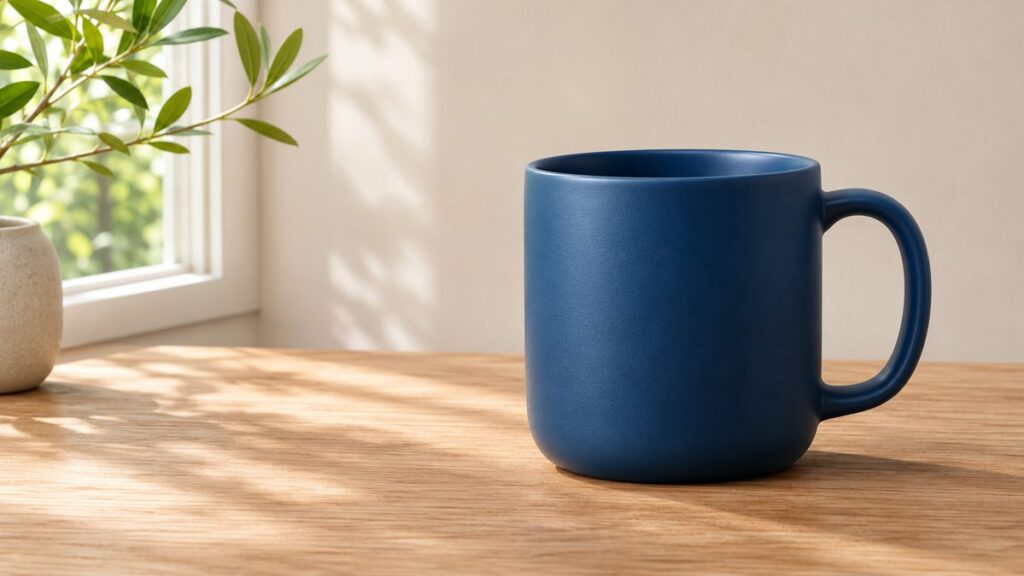
Use the supplied matte blue mug as the subject. Place it on a light oak table near a window, photographed at a front three-quarter angle. Use soft daylight from the left, a neutral background and a subtle contact shadow. Keep the mug color, handle shape and logo placement faithful to the reference. Leave space on the right for ad copy. Add no text or accessories.
This prompt gives the generator a clear brief. Inspect the result against the source even when the prompt asks for exact preservation. For an ad, create the copy separately so you can control spelling, type size and contrast.
Check accuracy before using a mockup in a listing
Compare the details buyers use to decide
Check that the color, product count, logo placement and packaging match the item you ship. Props should be clearly incidental. If buyers compare variants in a grid, use the same angle and crop for each one.
Prepare a primary image and a lifestyle image
Use a clear real-product view for the primary image when accurate representation or marketplace rules require it. A labeled mockup or lifestyle scene can illustrate context in a secondary placement if the channel permits it. For the complete tool overview, see our Artistly AI review.
Artistly product mockup FAQ
Do I need Artistly Premium for Product Mockup Creator?
The vendor lists the named tool as a Premium feature. Check selected-plan access before paying, especially if the offer also mentions general mockups.
Can I use an AI mockup as my main product photo?
Check the marketplace or store rules and compare the image with the real product. Use a verified photo when a generated scene changes the product or could mislead buyers.
What should I do if Artistly changes my logo?
Keep the original logo and add it in an editor using the correct angle and position. Compare the finished image with your approved artwork before publishing.
Check Artistly Pricing and Availability →
Sources: official pricing guide and Artistly tutorials.
Artistly
Check your mockup tool and plan