Affiliate disclosure. MentorsReview may earn a commission if you buy through links on this page.
Choose the right AgentOS tier for your team.
Compare agent limits, seats and automation capacity before buying the AppSumo lifetime deal.
Tier 1
One seat and 10,000 monthly ACT operations for testing a repeatable workflow.
Tier 2
Three seats and 20,000 monthly ACT operations, with one isolated environment.
Quick answer
This Boost.space Agents review finds the $79 Tier 1 most useful for a solo operator with one repeatable, data-heavy workflow to test. Teams should size the deal around seats, isolated environments and automation volume. Budget separately for AI usage and check AppSumo Plus eligibility at checkout.
Boost.space Agents review: What does AgentOS do?
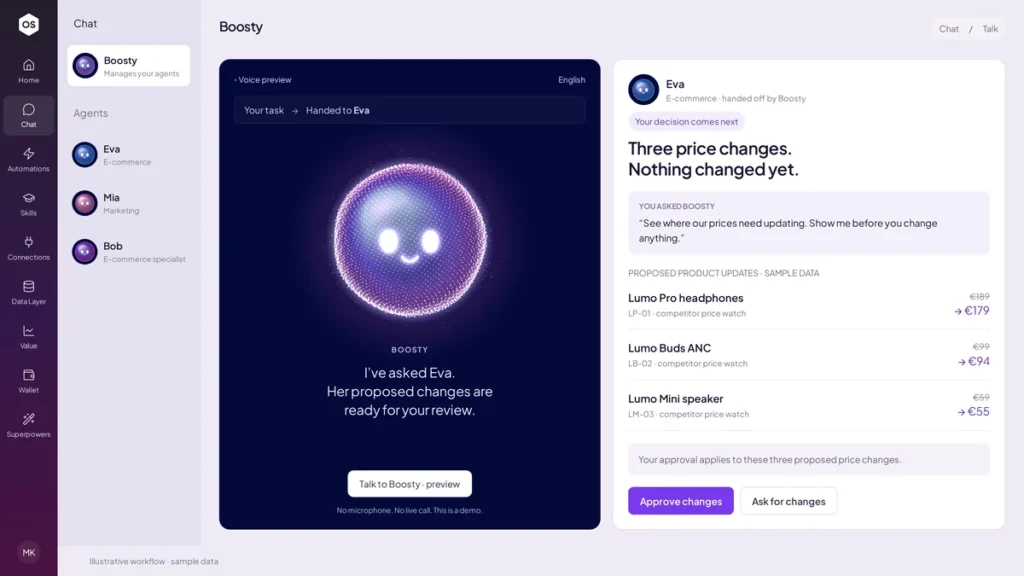
Boost.space Agents is listed as Boost.space AgentOS on AppSumo. It gives a business a workspace for AI agents with defined roles. A sales agent can prepare a follow-up queue, while an operations agent can inspect product data for missing fields. You can ask Boosty to route work, talk directly to a specialist agent, and reuse instructions through skills. Agents can work with data modules, connected apps and automations when the administrator grants access. The official AgentOS guide explains how the workspace, instances and permissions fit together.
That structure matters when several people need to repeat the same job. A chat prompt might give you a useful answer today. An agent with access to a defined table and a repeatable skill can work from the same inputs each week and return exceptions in the same format. The operational benefit comes from clear instructions, consistent data and an owner who reviews results. If your team is still deciding which spreadsheet is authoritative, settle that question before connecting accounts.
This research-based review compares the public deal terms and vendor documentation against common workflows. The examples below are evaluation scenarios. They show what to test before you depend on the product for client or revenue-critical work.
Boost.space Agents AppSumo pricing and tier limits
AppSumo displayed prices starting at $79 when we checked on November 14, 2026. The listing showed Plus membership as a purchase requirement and advertised lifetime access with a refund window of up to 60 days. Check your final membership and checkout costs, eligibility and activation terms on the listing. The headline price buys the license tier. Estimate any AI usage separately. The table covers the four tiers shown together in the public comparison.
Tier 1 makes sense for a solo buyer who needs one seat and can fit within three agents. Tier 2 mainly helps when a second person needs access or when you need more than three clearly distinct roles. Both list one isolated environment. If environment separation drives your purchase, Tier 3 is the first tier in the table that shows two. Tier 4 lists five environments, which is worth considering when several workstreams already need separation and have owners who can maintain them.
AppSumo also displayed Tier 5 at $999 and Tier 6 at $3,499. Confirm their complete limits and client terms on the listing before spending at that level. Count customer workspaces and contractual requirements first. The comparison distinguishes isolated environments from independent AgentOS platforms, so verify which kind of separation your implementation needs.
| Tier | Price | Agents | Environments | ACT ops/mo | Records | Seats |
|---|---|---|---|---|---|---|
| 1 | $79 | 3 | 1 | 10,000 | 10,000 | 1 |
| 2 | $179 | 8 | 1 | 20,000 | 25,000 | 3 |
| 3 | $349 | 20 | 2 | 50,000 | 75,000 | 10 |
| 4 | $599 | 40 | 5 | 100,000 | 200,000 | 25 |
What the lifetime deal still costs to run
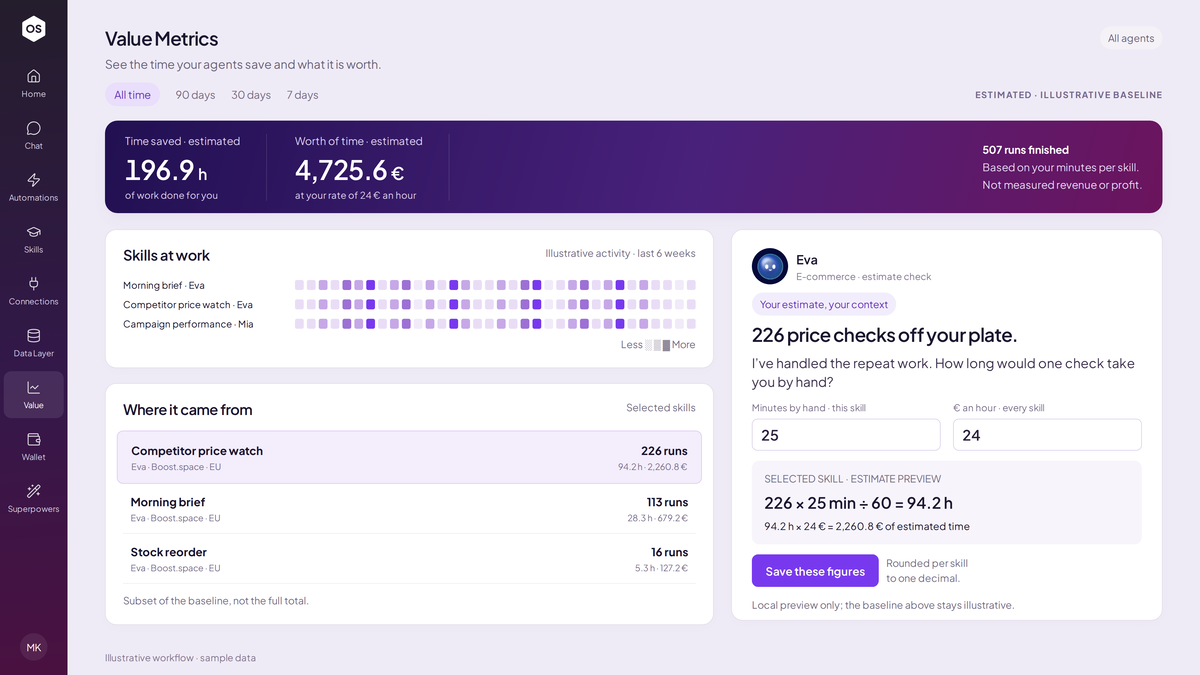
Budget for three different things. Records are the data you keep. ACT operations are measured against an automation allowance. Models, external data and other wallet-funded services can consume AI credits. The plan and billing guide describes the capacity counters. The agent model documentation explains how to configure supported provider keys. Check what is included for your tier and what is billed by your model provider before assuming a connected account covers your workload.
Use a representative week to model cost. Suppose a workflow runs against 250 records on each of 20 working days. That gives you 5,000 record checks each month. If your pilot measures two billable operations per check, your projection reaches 10,000 operations before retries or extra steps. The multiplication is a planning example. Measure the actual counters for your workflow and confirm how the service bills retries and scheduled runs. A workflow that sends just 5% of records to AI may have a different wallet cost from one that gives every record a long prompt.
Measure time as carefully as usage. For a queue that takes two hours weekly, include the minutes spent reviewing the agent’s output and correcting errors. A 30-minute review plus 15 minutes of maintenance gives back 75 minutes each week in this example. If review time eats the savings, narrow the job to the exceptions that actually change someone’s next action.
Three workflows worth piloting
E-commerce catalog QA. Start with a sample of 50 products in a read-only module. Give the agent the required fields and ask it to group missing attributes, invalid values and ambiguous records. Require SKU identifiers and reason codes so a merchandiser can spot-check results. Include deliberately incomplete products and valid edge cases. A successful pilot returns a manageable correction queue. Add write access only if the checks hold up and your team has a way to review or reverse changes.
Agency reporting. Choose one client and one recurring report. Ask the agent to summarize changes from an approved data export, show source rows for important numbers and flag missing periods. Have the account lead compare its answers with known reporting totals. A good pilot reduces formatting and research work while keeping editorial ownership clear. For concurrent client work, confirm account boundaries and how the chosen tier separates data before reusing the pattern.
Sales follow-up. Use a read-only sample and ask for a ranked list of overdue leads with reasons. Include examples of an active opportunity, paused account and already-closed lead. Review suggested next steps internally before allowing the workflow to change a record or contact anyone. Measure how many suggested items a sales rep would actually act on. A longer list can create more work if the prioritization is weak.
A practical first-week setup checklist
On day one, write down the job in a sentence and assign an owner. Define the input module, allowed fields, output format, run frequency and what counts as a mistake. Use a copy or small sample of records. Give the agent read-only access and connect only the account relevant to the pilot. The agent setup walkthrough shows where to set module and automation permissions.
Over the next few days, compare results with manual work. Keep a small log of misses, false positives and broken inputs. Test a missing field, a duplicate record and a case where the right answer is to ask a person. Check whether the output stays useful when a source format changes. Compare good and bad runs before adjusting instructions, so you can tell which change made a difference.
By the end of the week, inspect the usage counters and check that a second person can understand the setup without reconstructing it from chat history. Decide who handles credential expiry, a workflow failure or a bad write. If the trial has only proven a read-only report, keep those permissions while you decide whether additional actions are worth the upkeep.
Boost.space AgentOS vs other automation approaches
For a fixed workflow like copying a submitted form to a sheet and notifying a channel, evaluate Make or Zapier. Explicit steps make sense when the trigger, transformation and output are stable. If your team already maintains scenarios or Zaps that work, compare the cost of adding one role with the migration and retraining time a new platform would require.
For teams that want greater control over workflow logic and already have someone who maintains automation infrastructure, n8n is another comparison point. Think about who owns updates, secrets and failure recovery. AgentOS is most interesting when several role-based agents need the same data with different permissions and the team wants a shared interface for delegation.
If your project is about building or managing AI agents with another AppSumo tool, see our UnleashX review to compare workflow priorities. For marketing research, the Preuve AI review covers a separate use case. If your output is a campaign page, see the HTML Pub review for publishing costs and page limits.
Pros, drawbacks and who should buy
Pros. Per-agent permissions help match access to a defined job. A shared data layer makes it possible for specialists to work from consistent business records. Reusable skills give repetitive jobs a clearer home, and the usage and value views give an owner a place to investigate volume and outcomes.
Drawbacks. Buyers have to track seats, environments, database records, monthly operations and AI spending. AppSumo Plus affects the entry cost. Teams also need to maintain app credentials, data quality and workflow instructions. Agent outputs deserve human review before they affect clients, prices or systems of record.
Verdict. Start with Tier 1 if you have one owner, one recurring job and enough room for measured usage. Choose Tier 2 for additional seats or agent roles. Consider Tier 3 or above once environment isolation or measured volume makes the choice concrete. If you only need one predictable two-step integration, compare the effort of setting it up in tools your team already uses before paying for a new workspace.
What to verify before checkout
Write down the exact source app, account type and action your first workflow needs. A catalog integration that can read product details might still need different permissions to edit variants or update inventory. Confirm the required connector action with a small test, including the fields you expect to see and the way the agent handles empty responses. Save a copy of the tier limits and your evaluation notes alongside the project so the next person can tell which capacity assumptions informed the purchase.
Pick one success metric before running the pilot, such as minutes per verified report or the share of catalog issues caught. Use the same sample for the manual and agent-assisted runs so you can compare outcomes.
Frequently asked questions
Is Boost.space Agents the same as Boost.space AgentOS?
AgentOS is the name shown on the current AppSumo listing at the Boost.space Agents URL. Classic Boost.space is a separate product. Existing Classic buyers should check the current migration terms with the vendor before moving capacity.
Does lifetime access include unlimited AI model usage?
The license and AI usage are separate. Confirm the included credit, supported provider settings and any externally billed usage for the workflow you want to run.
Which AppSumo tier is best for one person?
Tier 1 is the starting point if one seat, three agents, one environment and the documented record and operation caps cover your pilot.
Do you need AppSumo Plus?
The listing displayed the purchase as exclusive to AppSumo Plus members when checked. Verify the total at checkout.
Can every agent edit my business records?
The vendor documents module-level permissions you set for each agent. Choose read access when a task only needs to inspect and summarize records. Check automation and connected-app permissions as well.