Affiliate disclosure. MentorsReview may earn a commission if you buy through links on this page.
Track the AI answers your buyers actually ask for.
Compare four tiers by prompt capacity, competitor coverage and reporting needs before buying.
Quick answer
This AnswerRank review finds the $39 AppSumo Tier 1 a sensible pilot for one brand monitoring up to 50 prompts and five competitors. Choose Tier 2 when a defined prompt list outgrows that limit. Tier 4 is the only AppSumo tier listed with API access. Before buying, confirm how prompt variants count and whether the supported models, regions and export options cover your reporting needs.
Tier 1 Standard
Start with one audience, a controlled set of buying questions and the competitors your customers compare.
Tier 2 Pro
Useful when your product or regional groups need separate measurement and five competitor slots are too few.
AnswerRank review: What the platform measures
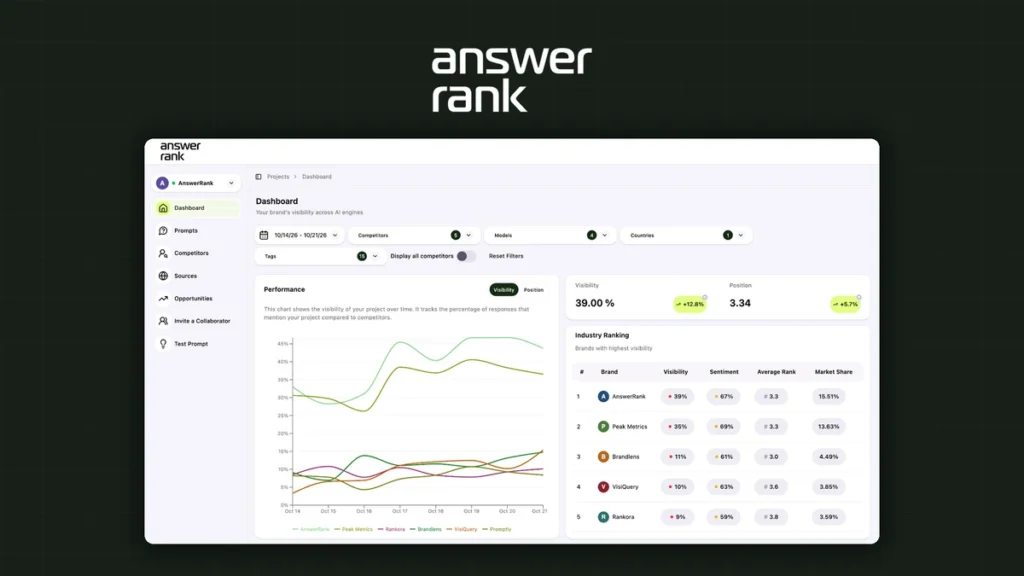
AnswerRank is an AI visibility tracker. It runs selected questions against supported AI engines and reports how your brand and competitors appear in the returned answers. The AppSumo listing names ChatGPT, Perplexity, Gemini and Copilot across the deal tiers. Its capabilities include tracking brand mentions, position and sentiment, comparing competing brands, and inspecting which websites the sampled answers cite. The vendor’s knowledge base provides setup and prompt-selection guidance.
The tool is best understood as a recurring research panel. A local service company might track questions about pricing and service areas. An ecommerce team might watch product recommendations by use case. An agency might report how a client appears alongside competitors in a defined set of purchase decisions. Each example benefits from an owner who can trace an observation back to an answer and decide which page, listing or product detail to improve.
MentorsReview checked the AppSumo listing and AnswerRank’s public product documentation on November 14, 2026. This research-based guide evaluates published features and terms. The proposed workflows and numbers are examples for a buyer’s pilot. The review does not include a hands-on account test or an independently measured ranking lift.
AnswerRank AppSumo pricing and tier limits
| AppSumo tier | 1 · Standard | 2 · Pro | 3 · Agencies | 4 · Agencies |
|---|---|---|---|---|
| One-time price | $39 | $119 | $239 | $519 |
| Prompts per month | 50 | 150 | 300 | 600 |
| Competitor tracking | 5 | 10 | 15 | 20 |
| API access | — | — | — | Included |
| Markets and collaborators | Unlimited | Unlimited | Unlimited | Unlimited |
The AppSumo listing displayed a purchase option on November 14, 2026. It describes a one-time purchase rather than an AppSumo subscription, with activation required within 60 days and refunds advertised up to 60 days. It lists tier changes without stacking codes. Check the order terms for current pricing, applicable tax, eligibility and the latest refund and tier-change conditions. AppSumo separately describes additional coverage for Plus members.
The entry tier is a good fit when you can define one manageable panel. Tier 2 adds 100 prompt slots and five competitor slots for $80 more at the checked prices. Tier 3 doubles Tier 2’s prompt allowance and is the option to compare if your team can work within 300 slots and does not require an API. Tier 4 makes sense when an existing reporting system has a credible need to pull the data or when a documented tracking plan exceeds the Tier 3 limits. Ask about API limits and available endpoints before buying for an integration.
The vendor’s direct product page advertises separate monthly offers. The published prompt limits and service descriptions differ from the AppSumo deal, even where the plan names match. Confirm with the vendor if expert sessions, a particular support channel or assisted implementation is critical. The AppSumo table describes monthly tracking capacity. Separate draft-credit costs or overage prices could not be confirmed from the terms reviewed. Ask about quotas for draft generation, how resets work, and any paid extras before relying on them.
How to interpret visibility, sentiment and source data
Start with the sample behind each metric
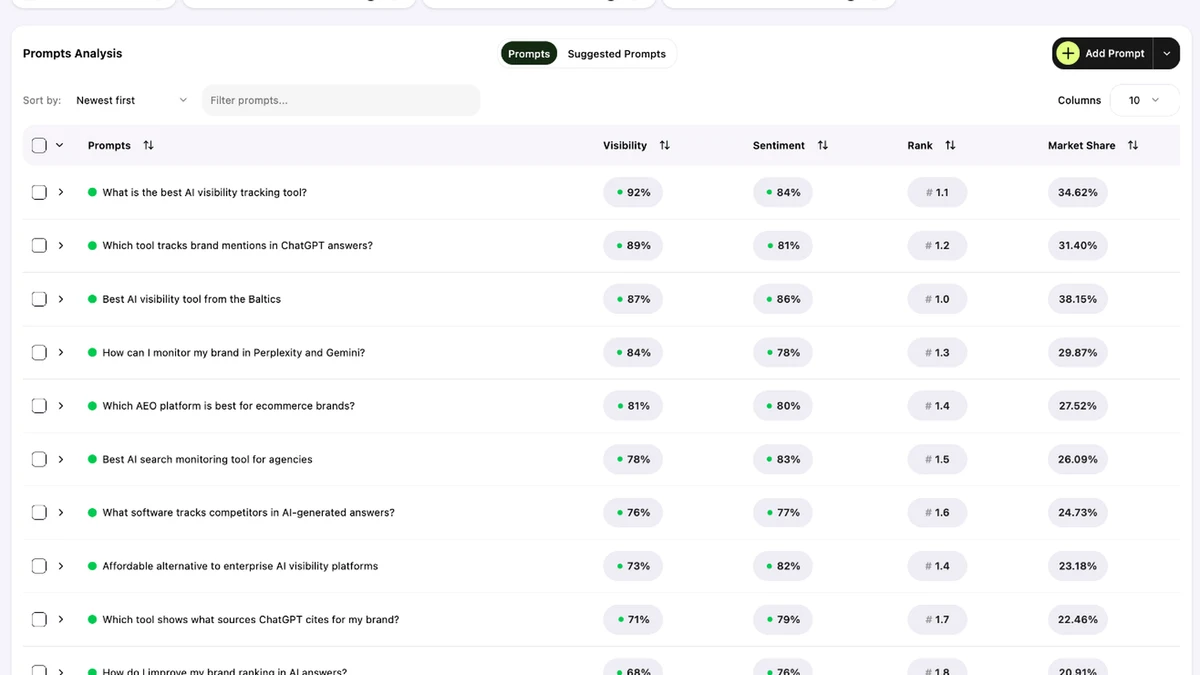
Visibility describes appearances for the answers being monitored. If your brand appears in 12 of 40 comparable responses, an illustrative mention rate is 30% for that sample. You still need to know the engine, date range, tracked questions, location settings and how the vendor handles missing results. A panel with lots of branded prompts can make broad market discovery look stronger than it is. Compare branded and unbranded questions in separate groups.
Read the answer when a number changes
A brand can be mentioned in a warning, a list of alternatives or a direct recommendation. Each appearance carries a different business implication. Open a sample of the actual answers and check whether the model got prices, features and service regions right. A positive label may hide an important factual error, while a weak average position may have little impact if it comes from a question buyers rarely ask. Treat source citations as leads to investigate and check what each cited page actually says.
Keep downstream outcomes in a separate report
A tracked response is an observation from your panel. To see what happened after a real visit, review referral sessions and conversions in your analytics tool. For impressions from Google’s generative search features, use the Search Console generative AI report where data is available. Pair the datasets by topic or landing page when possible. A simultaneous lift in mentions and signups is a reason to investigate what changed, with other campaigns and seasonality still in view.
A 30-day AnswerRank pilot for a small business
Build a panel from real buyer questions
Start with about 40 distinct questions and leave room for replacements. A practical split is 15 unbranded discovery questions, 10 comparisons, 10 questions about constraints or use cases, and five branded accuracy checks. Pull examples from support tickets, sales notes and product pages. For a small US ecommerce store, track a mix of budget, compatibility and purchase-intent questions. Include the rivals buyers actually name and record the language and country settings used for the baseline.
Make one evidence-based change
Suppose competitors repeatedly appear in answers about a product’s fit for small offices. Read those answers, check the citations and compare the information with your product page. If buyers need dimensions, setup time or supported devices, update the page using measurements or specifications you can verify. If the problem is an obsolete listing, fix that listing at the source. Keep a simple log with the question group, affected URL, original claim, updated claim, and date.
Review the same panel after the change
Compare similar periods while keeping the same tracked questions and engine settings. Identify gains that persist and outliers worth checking manually. A measurement routine is successful when it produces useful work, such as correcting a false claim or finding a question your best page fails to answer. Record how much time it takes to prepare the report and how often a finding changes the team’s priorities.
Set a clear rule for upgrading
Use your first month to count questions you actually need to monitor. For example, if you need four distinct groups of about 30 questions, Tier 2’s listed 150-prompt capacity is the next plan to check. Confirm how multi-model or country variants consume the allowance before budgeting. For multiple clients, ask how competitor limits and prompt allocation are applied across markets and confirm what a client can see when invited to your workspace.
AnswerRank vs Search Console, manual checks and Semrush
Manual checks and a spreadsheet are enough to learn which questions produce meaningful answers. Run the same shortlist repeatedly and record the output and sources. This makes it easy to inspect the full context and to stop tracking noisy questions. The workload becomes harder to sustain once you add several engines, markets and clients. Use a manual baseline to judge what a recurring tracker actually saves.
Search Console is a useful companion for first-party Google data. It can help prioritize pages and see impressions from Google’s generative search features, while AnswerRank tracks the selected questions and models described in its own offering. If the main problem is low Google search traffic, start with the pages and queries you already have evidence for. AnswerRank is a stronger fit when your team specifically needs a repeated cross-engine view into brand mentions, competitor answers and cited sources.
The Semrush AI Visibility Toolkit documentation describes daily visibility tracking for selected AI platforms, with reports for competitors and citations. Evaluate it when Google AI Mode tracking or an established Semrush workflow is important. For either tool, use the same question list and compare engine coverage, export formats and the time a person needs to confirm findings. For related purchasing decisions, see our Preuve AI review for research workflows, Boost.space Agents review for acting on existing business data, and Brainer review for launch and content workflows.
Pros, drawbacks and who should buy
Pros. A repeatable panel makes it easier to observe changes across supported AI engines. Side-by-side competitor data helps marketers spot the questions where a rival is consistently named. Source views can point a team toward outdated product details, missing answers or relevant publications. The entry tier keeps the upfront cost low for a team that already owns its content decisions.
Drawbacks. The panel represents selected questions and sampled outputs. Model changes and regional differences can shift results without any action on your site. Some workflows need precise settings for frequency, location and data retention that buyers should test early. API access substantially increases the AppSumo entry price for automated reporting.
Verdict. Consider Tier 1 if you own the content for one brand and can act on a shortlist of visibility gaps. Start with Tier 2 or Tier 3 when teams have a written monitoring plan that needs the additional capacity. Keep Tier 4 for a validated API requirement or a workload that exceeds 300 prompts. Skip the purchase for now if your only reporting requirement is basic Google search performance or a handful of occasional manual checks.
Checkout checklist
- Count the questions you need, including country, language and model variants where applicable.
- Confirm how often prompts run and whether changing or deleting one affects your monthly allowance.
- Ask whether login, location, exact model versions and source history meet your method for repeatable reporting.
- Verify what collaborators and clients can see across markets and whether you can download results in the format you need.
- Confirm API endpoints, authentication, rate limits and historical data if the reporting integration drives the purchase.
- Record your activation and refund dates, then schedule a review of one meaningful report before your refund window ends.
Frequently asked questions
Is the AnswerRank AppSumo deal available?
AppSumo displayed a purchase option when checked on November 14, 2026. Tier 1 was listed at $39. Check the current listing for live availability and checkout terms.
Which tier includes an API?
The AppSumo FAQ identifies Tier 4, listed at $519, as the API tier. Confirm the endpoints you need and their rate limits with AnswerRank.
Does unlimited markets mean unlimited prompts?
The listing shows unlimited markets and a defined monthly prompt cap on each tier. Plan your tracking around the limits for the license you buy.
Does AnswerRank guarantee more AI mentions?
AnswerRank provides measurement and suggestions. Outcomes depend on the questions, source material and engine behavior. Treat sustained changes within comparable samples as evidence to investigate.
Is Tier 1 enough for a local business?
It can be enough for a narrow pilot if your selected questions and competitors fit the 50-prompt and five-competitor limits. Confirm that the available location settings match the area you serve.